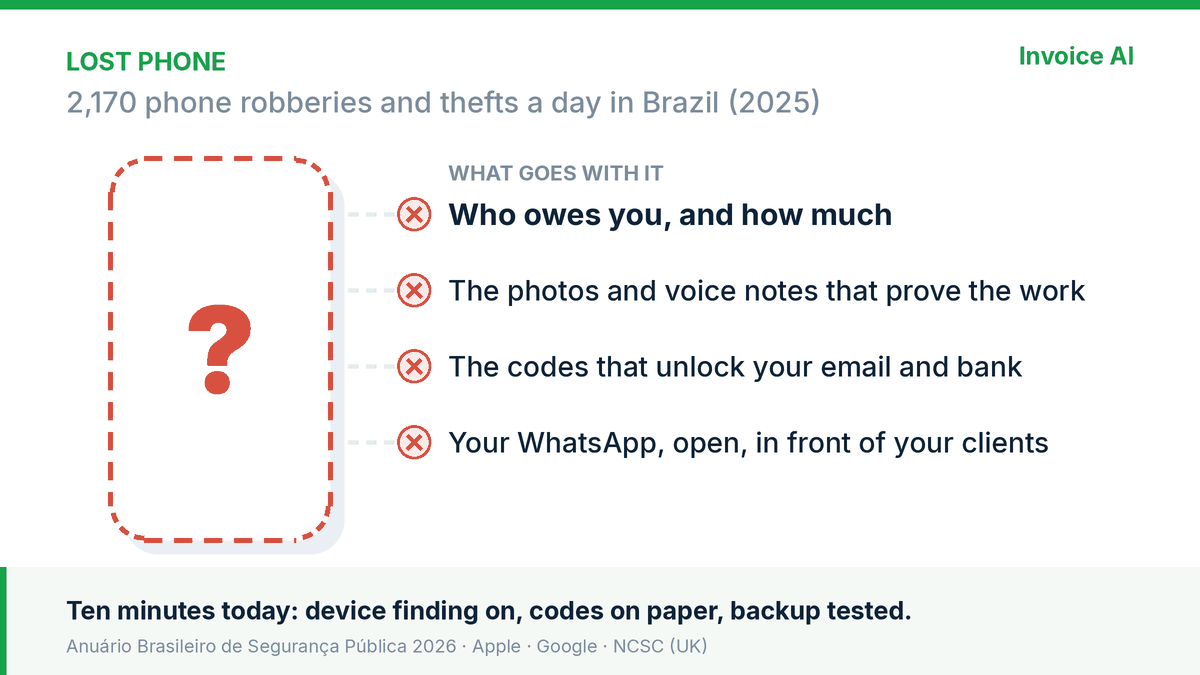
For a lot of people who sell on their own, the phone is the cash register, the invoice book, the calendar and the filing cabinet. It holds the invoices you sent, the chats where a client said "I'll pay you Friday," the photos of finished work and your banking app. One careless moment on the bus and all of it ends up in someone else's pocket.
This post isn't about protecting the device. It's about what you lose along with it, what to set up today, and what to do in the first hour if it ever happens.
How many phones go missing
Brazil is a useful example because it counts them every year. According to the Anuário Brasileiro de Segurança Pública 2026 from the Brazilian Public Security Forum (accessed Oct 7, 2026), 792,284 phone robberies and thefts were reported to police in 2025. That's about 2,170 a day, and it was 7.7% fewer than in 2024.
The same report warns that police figures fall short. In the survey it cites, 8.3% of the population said their phone had been robbed or stolen in the previous twelve months. And today 6 in 10 aren't taken by force: they are thefts, with no violence or threat.
What you actually lose
The device can be replaced in an afternoon. The expensive part is something else:
- Who owes you and how much. If that list only lives in your chats, it's gone with the phone.
- The proof. Photos of delivered work, voice notes with what was agreed, payment receipts.
- The keys to your accounts. The codes that arrive by text or in an authenticator app are how you get into your email and your bank. If they only reach that phone, you're locked out of your own accounts.
- Your voice with clients. With your WhatsApp open, someone can message them "I changed accounts, pay me here."
Today, while the phone is in your hand
It takes ten minutes. Done today, it changes what you can do later.
- Turn on device finding. On iPhone it's Find My; on Android, Find Hub. Apple is clear about it: if Find My wasn't on before the device was lost, you can't mark it as lost or erase it remotely. Google requires the phone to be signed in to a Google Account, with Find Hub on and a PIN, pattern or password set.
- On iPhone, turn on Stolen Device Protection. According to Apple, away from familiar locations it requires Face ID or Touch ID to see saved passwords and cards, and adds a one-hour delay before your account password can be changed. That way, someone who knows your passcode doesn't get everything.
- Keep the backup codes for your email's 2-step verification somewhere other than the phone. Printed, in a drawer. Without them, getting your email back can take days.
- Make a backup and check that it works. The UK's NCSC recommends copying all the data your business needs to operate, and its list names invoicing and customer information. It suggests two backups (one online, one on a separate drive) and checking that you can restore them.
- Keep your list of unpaid invoices somewhere other than the phone. A spreadsheet, a cloud account, a notebook: anywhere you can reach from another device.
The first hour
If the phone disappears, the order matters more than the speed. From another device:
- Mark it as lost. At icloud.com/find or in Find Hub in a browser. According to Apple, Lost Mode locks the iPhone with your passcode and suspends your Apple Pay cards. Signing in to icloud.com/find doesn't require a verification code, precisely because the device that would receive it is the one you lost.
- Change your email password and sign out of open sessions. Your email is the door to recovering everything else.
- Call your carrier to block the line and get a new SIM. While the line is live in someone else's hands, your text codes go to them.
- Call your bank and block your cards and the app.
- Warn your clients through another channel, in one sentence: "My phone was stolen. If you get a message from me asking you to pay a different account, it's not me." That sentence can save them a payment and save you an argument.
- File a police report. Your insurer, bank or carrier may ask for it, and it puts the date on record.
Erasing the phone remotely is the last step, not the first: once it's erased, you can no longer locate it. And one warning from Apple that applies to any brand: Apple will never contact you to say your iPhone has been found. Messages claiming that are usually the second theft attempt, this time for your password.
Getting paid again the same day
With a backup in place, the new phone is the same business by the end of the afternoon. You restore, sign in with your backup codes and open the list of who owes you. The client who was going to pay on Friday pays on Friday, because you still know they owe you.
Without a backup, the theft doesn't cost you a phone. It costs you weeks rebuilding from memory what you're owed. And a client who is running late is not going to remind you.
What to remember
Your business may fit in a phone, but it shouldn't live only there. Turn on device finding, keep your backup codes on paper, back up what you need to get paid and have the sentence for your clients ready. Ten minutes today saves you the worst day of the year.
Sources, accessed October 7, 2026: Brazilian Public Security Forum, Anuário Brasileiro de Segurança Pública 2026; Apple, How to find your lost iPhone or iPad and About Stolen Device Protection for iPhone; Google, Find, secure, or erase a lost Android device; NCSC, Backing up your data. The daily average is our own calculation from the Anuário figure. This is information, not advice.